# Raios360 - Field Operations Management Platform
**One Platform. More Reliable Teams.**
**One platform for more reliable inspections, audits, field work, compliance, maintenance, and AI-powered reporting.**
Raios360 is the multi-tenant SaaS field operations platform that senior operations leaders run the business on. It leads with four things decision-makers care about: (1) built-in AI that drafts the report, flags the anomaly, and answers the operational question; (2) reliable data that stays accurate and available offline and reconciles when it matters; (3) enterprise-grade security with strict tenant isolation you can defend to your board and auditors; and (4) trust earned over years serving real businesses in the field. From task assignment to form collection, serial and lot tracking to board-ready reporting, Raios360 coordinates your entire mobile workforce.
## No-code builder
Build the field app your operation needs without code. An organization's own admins build three things, in the browser, on Raios360's own records:
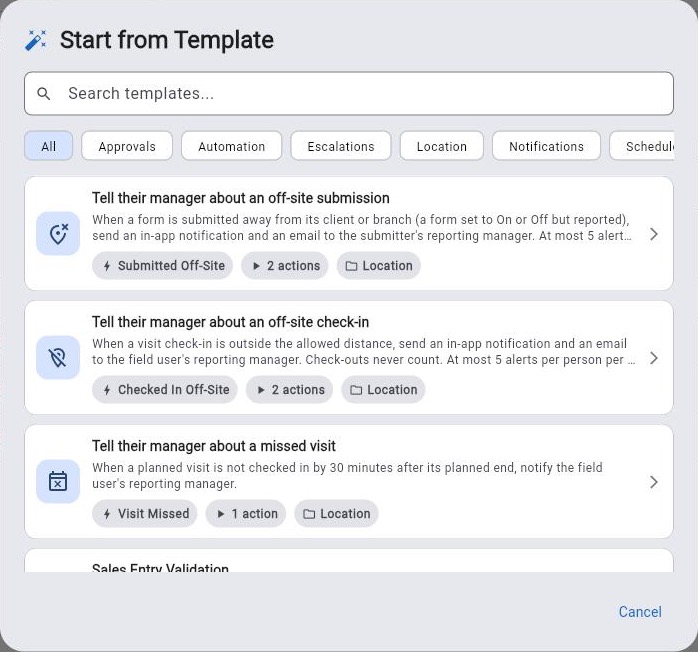
- **Workflows**: a trigger and the steps that follow it — 29 triggers (task, form, approval, visit, location, ticket, metric, Solution, schedule and on-demand), 24 actions (notify, email, tasks, approvals, data lookup, create/update records, tickets, visits, notes, branch, wait, for each, parallel lanes, webhook, chat channel) and 14 ready-made templates. Guided builder or visual canvas; conditions tested against real submissions before going live; run limits; every run recorded.
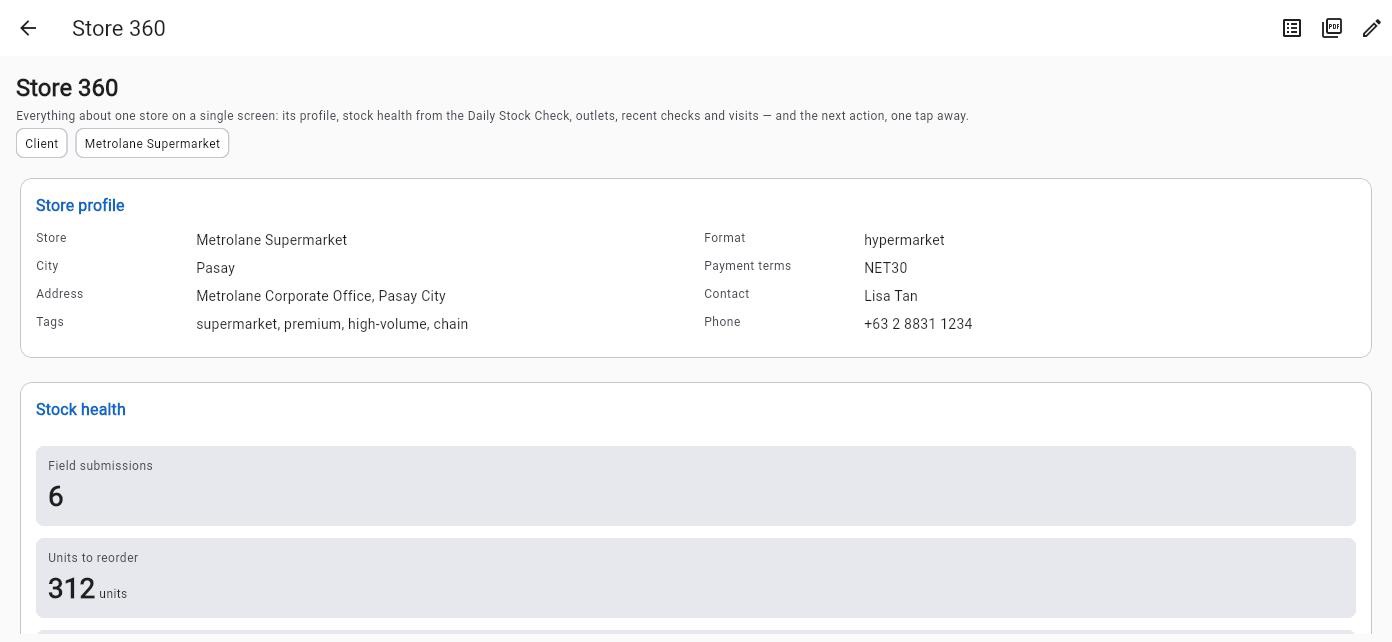
- **Pages**: record pages and dashboards assembled from 24 block types (fields, joined fields, related lists, editable fields, data tables, KPIs, charts, formula KPIs, checklists, quick updates, embedded forms, action buttons, signatures, QR codes), published to the mobile app — also offline — with per-block visibility.
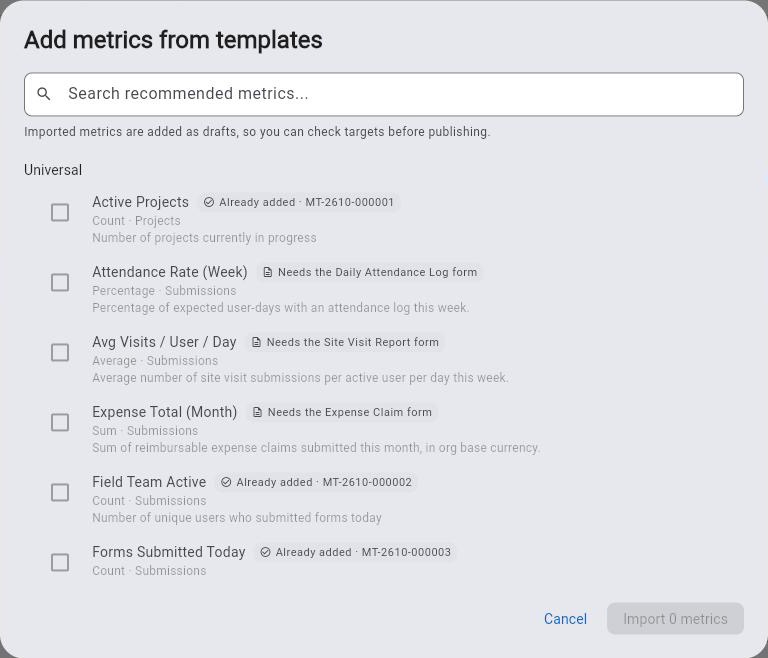
- **Metrics**: define a KPI once (7 types over 11 kinds of record) and reuse it on dashboards, pages and reports; recommended metrics for every organization and per industry; a metric crossing a threshold can start a workflow.
It is not a general-purpose app builder; a workflow reaches outside software only through a webhook you configure. Every building block is listed at https://raios360.com/no-code-builder
## Key Features
### Work Management
- **Projects**: Create and manage projects with custom statuses, priorities, and timelines. Link tasks, forms, and submissions for complete traceability. Project templates for recurring work.
- **Tasks**: Assign to individuals or teams with due dates. Full lifecycle: assign, accept, start, pause, complete, verify. SLA tracking with breach notifications. Task rework for quality control.
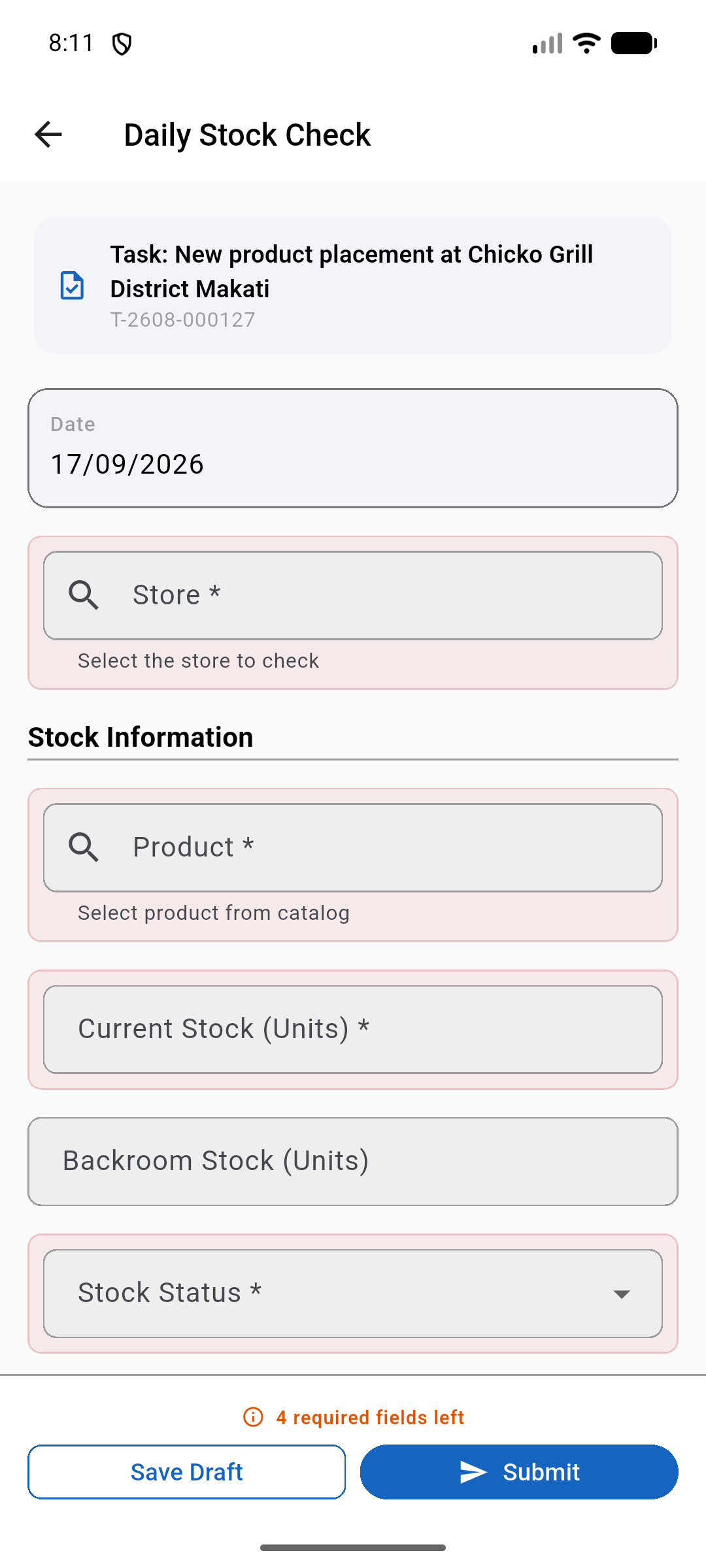
- **Forms**: Visual form builder with 51 field types including check-in location (GPS + timestamp proof). Version control, conditional logic, real-time validation. Data lookup fields for clients, products, serials, lots, databases. Barcode/QR scanning across products, serials, lots, and custom databases.
- **Submissions**: Approval workflows with multi-level chains. Full audit trails with metadata (device, location, network, duration). Resubmission workflow. Archive and export.
### Field Operations
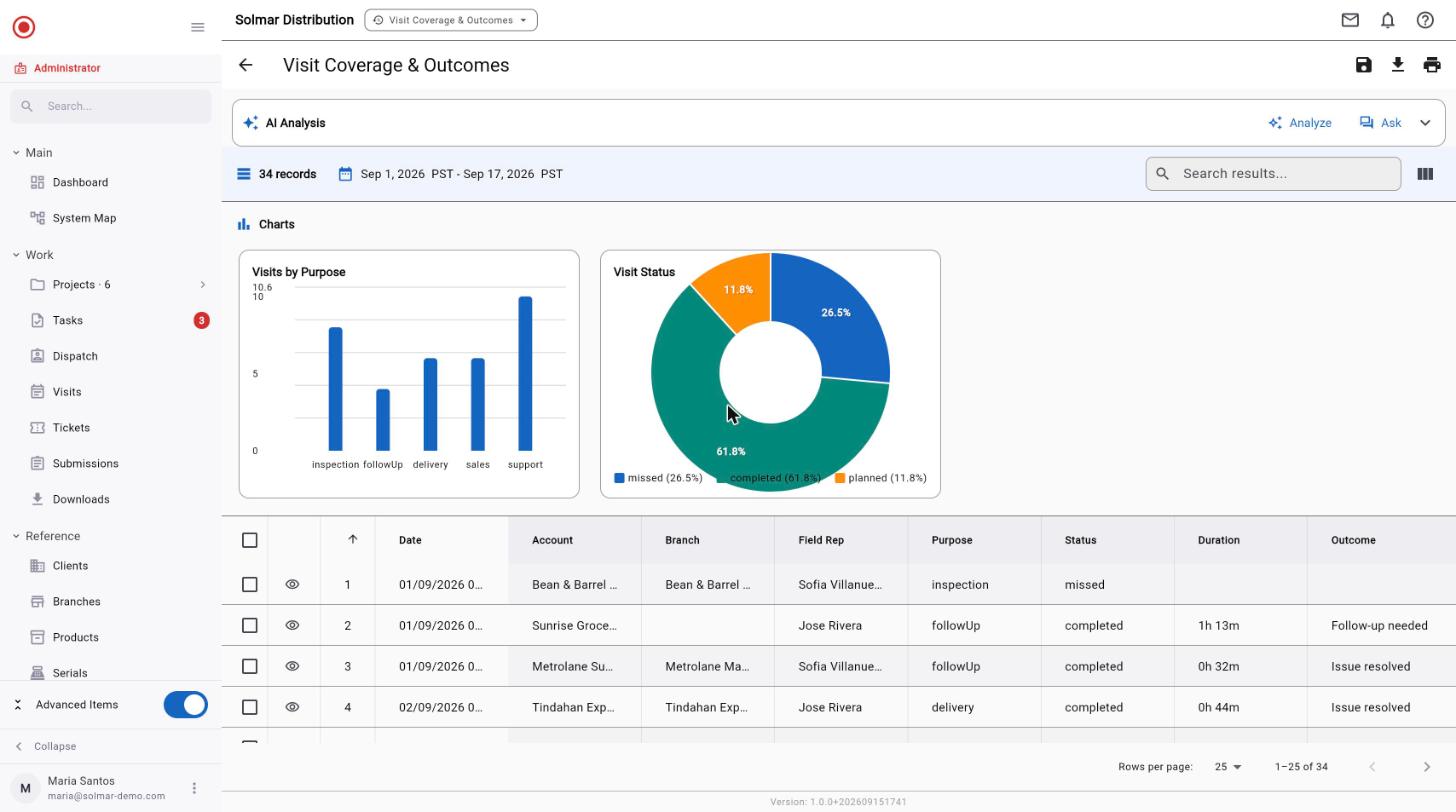
- **Scheduled Visits**: Plan field visits to client locations. Purposes: sales, support, delivery, inspection, maintenance, follow-up. Calendar integration. Status tracking.
- **Geolocation Check-In/Out**: GPS-verified arrival/departure. Location + timestamp for compliance. Duration tracking, overdue detection. Visit outcome recording.
- **Attendance Tracking**: Clock in/out with GPS verification. Break management. Team dashboard. Geofencing support.
### Data Management
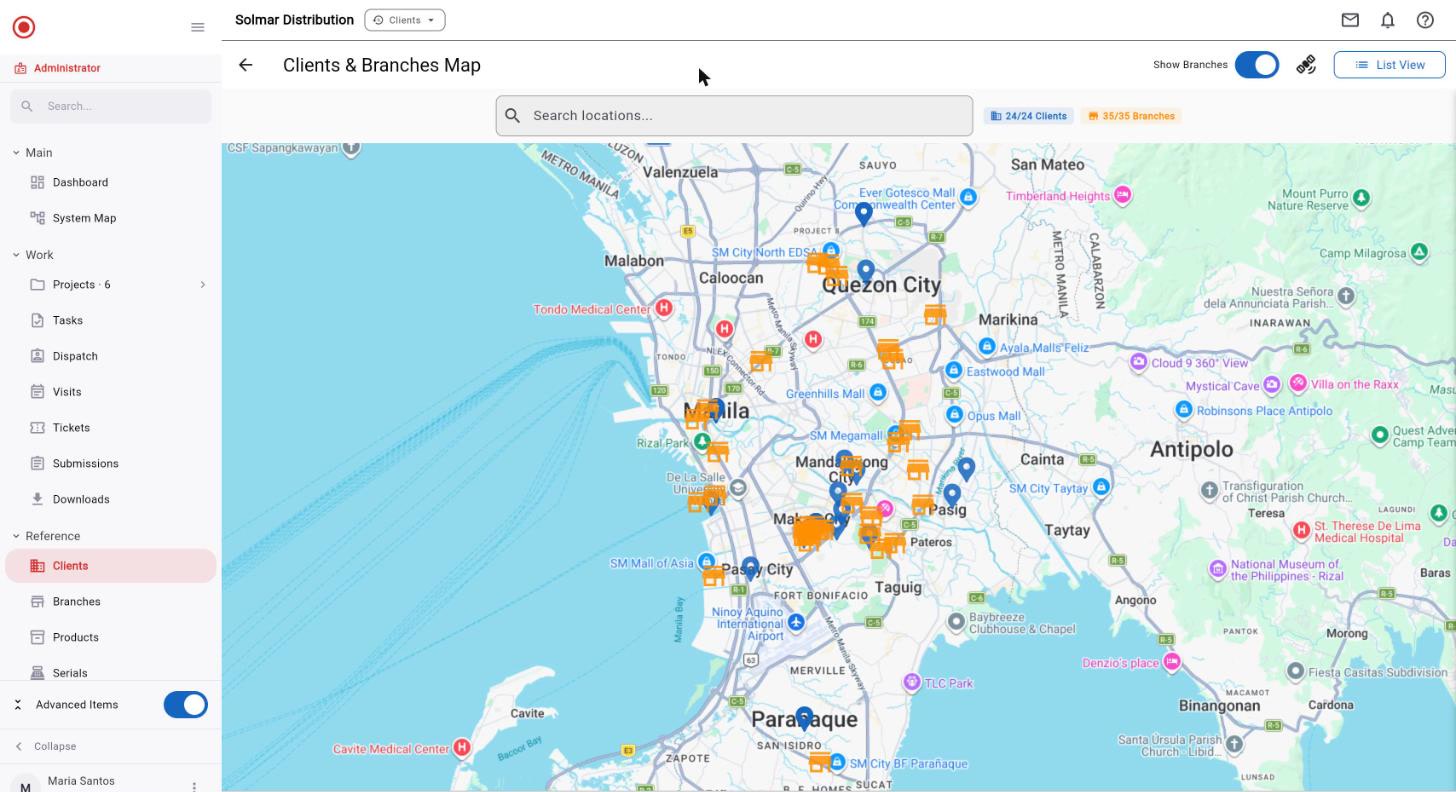
- **Client Database**: Contact info, multi-location branches, 15 custom field types, linked tasks/visits/submissions.
- **Product Catalog**: FMCG-ready. SKU, barcode, brand, category. Multiple price types (retail, wholesale, promotional, cost). Price groups. CSV import/export.
- **Serial Tracking**: Track serialized assets through their full lifecycle. Serial numbers with per-unit warranty tracking. Client and sales rep linking. Financial tracking (discount, tax, payment method). Buyer information capture. Supplier and delivery management.
- **Lot Tracking**: Manage batch and consumable goods with lot numbers, expiry dates, and quantity tracking. Link lots to products, clients, and form submissions.
- **Custom Databases**: Unlimited databases with custom schemas. Full-text search. Offline sync. Barcode lookup in forms.
### Reporting & Analytics
- **Report Builder**: Basic and advanced. Multi-form sources, cross-form joins. Aggregations (sum, avg, count, min, max, median). Calculated fields. AND/OR filters.
- **Chart Builder**: 8 types: bar, line, pie, donut, area, scatter, heatmap, table. Live preview. Custom styling.
- **Export**: PDF with company branding, Excel/CSV, scheduled delivery, report archive.
- **Dashboards**: Real-time KPIs, task completion rates, submission trends, visit statistics.
### AI & Integration
- **AI Analytics Assistant**: Natural language data queries. Auto chart/table generation. Conversation history. Supports OpenAI, Anthropic, Google AI, Azure. Organization's own API key.
- **MCP Server**: 26 tools (12 read, 14 write). Permission-bounded. 7 schema resources. 5 prompt templates. Connect Claude Desktop, IDE plugins, custom apps.
- **API Access**: REST API for submissions and reports. API keys with scopes and quotas. Audit logging.
### Team Management
- **Users**: Email invites, multi-org support, admin password reset, activity tracking.
- **Groups**: Hierarchical structure, group leaders with scoped access.
- **Positions & Org Chart**: Positions, an org chart, and regional access by office.
- **Roles & Permissions**: Built-in Administrator, Manager and User roles. Custom roles. 162 permission combinations (18 resources x 9 actions). Quick and Advanced permission pickers.
### Communication
- **Messaging**: Direct messaging, tap-to-acknowledge, read receipts, threads, channels.
- **Push Notifications**: Task, submission, visit, and message alerts. Multi-device. Deep linking.
- **Notification Center**: Centralized inbox, read/unread, date grouping.
## Platform
- Multi-tenant with complete data isolation
- Personal data behind controlled access: sensitive IDs masked, erase on request
- Owner-only settings for lasting changes, every change logged; regional access for regional managers
- Each office keeps its own time zone; dates and report periods follow the office's working day
- Module feature toggles (Clients, Products, Serials, Lots, Databases, Workflows)
- Self-service registration with trial period
- Cross-platform: Flutter for web, iOS, Android
- Full offline mobile support with automatic sync
- Human-readable IDs (Dated, Org-Prefixed, Simple formats)
## Applications
- **Web App**: Dashboard, project/task management, form builder, submission review, visit scheduling, data management, report builder, team admin, settings.
- **Mobile App**: Task execution, form filling with photos/signatures/barcodes, GPS check-in, attendance, product/serial browser, offline mode, messaging.
- **Admin Portal**: Organization management, module toggles, user admin, templates, subscription plans, platform analytics.
## Industries
FMCG & Retail, Field Services, Healthcare, Construction, Logistics, Agriculture, Utilities, Real Estate, Local Government, Security Teams.
## Solutions (add-ons)
Ready-made workflows, switched on per organization by the Raios360 team; some carry a fee of their own.
- **ID Document Capture**: Photograph the ID. The record fills itself in. https://raios360.com/solutions/id-document-capture
- **Leads**: From first contact to client, without retyping a thing. https://raios360.com/solutions/leads
- **On-Shelf Availability**: Know which must-carry products are on the shelf, store by store. https://raios360.com/solutions/on-shelf-availability
- **Paper Form Capture**: Keep the paper. Lose the re-keying. https://raios360.com/solutions/paper-form-capture
- **Personnel Monitoring**: A work order opens the gate. A badge alone does not. https://raios360.com/solutions/personnel-monitoring
- **Public Feedback Survey**: A QR code at the counter, and every answer in a dashboard. https://raios360.com/solutions/public-feedback-survey
- **Visitor Management**: Every visitor signed in, compared, and approved by a person. https://raios360.com/solutions/visitor-management
## Pricing
- **Free Trial**: 30 days, all features, unlimited users, no credit card required
- **Standard**: $18/user/month ($15/user/month billed annually — save 17%)
## Links
- Register: https://app.raios360.com/register
- Login: https://app.raios360.com/login
- Website: https://raios360.com
- Product Brochure (PDF): https://raios360.com/raios360-brochure.pdf
Run your field teams from one system.
Raios360 gives operations teams real-time visibility into every task, visit, inspection and field report — even when your team is offline.
Capture it. Verify it. Act on it.
30 days free · No credit card required
- Works offline
- GPS verification
- AI-powered reporting
- Built for mobile teams

- Live on Google Play — 177 countries
- Runs on Google Cloud infrastructure
- Your own isolated workspace — see how
- No credit card, no setup fee, cancel anytime
The Difference
Six places your field data lives today. Then one.
Before Raios360
- Updates arriving as WhatsApp messages
- Paper forms that reach the office days later, if at all
- Excel spreadsheets, re-keyed by hand and version-forked
- Visits nobody can prove actually happened
- Photos scattered across a dozen personal phones
- Hours spent compiling a report that is stale on arrival
Nothing here is wrong on its own. Together they mean no one can answer “what happened yesterday?” without asking six people.
With Raios360
One operational record.
Every visit carries its own assignment, location, answers, photos and verification — in one record, from the moment it is scheduled to the moment someone acts on it. Nothing is re-keyed. Nothing is chased.
- Assignment
- GPS
- Form
- Photos
- Verification
- AI
- Report
- Action
How It Works
From assignment to verified result
01
Assign
Give every team member clear work, locations and deadlines.
02
Execute
Capture photos, signatures, GPS and data — even without connectivity.
03
Verify
Automatically check submissions, locations, attendance and anomalies.
04
Act
AI summarizes what happened and tells managers what needs attention.
No-code builder
Build the field app your operation needs — without code.
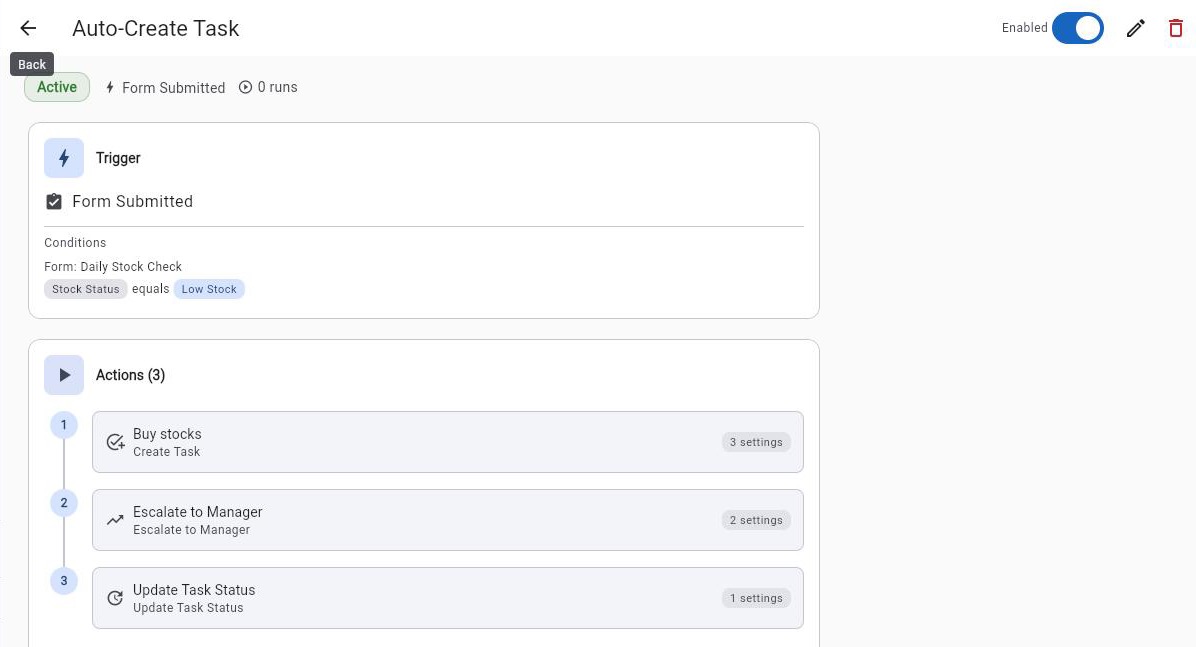
Your own admins build the workflows, pages and metrics your team runs on — in the browser, from ready-made blocks, on the same records your field team already creates. No developer, no software project, no waiting for a release.
Workflows
When something happens, the next step happens by itself.
29 triggers · 24 actions · 14 ready-made templates
- Pick a trigger — a form submitted off-site, a visit missed, a task overdue, a metric off target — then add the steps that follow
- Branch on an answer, wait, repeat for each line item, or run two lanes at once
- Build it in a guided four-step builder or on a visual canvas, and test the conditions against real submissions before it goes live
Metrics
Define a KPI once. Use it everywhere.
One definition feeds the dashboard, the record page and the report — so the number is the same number wherever a manager reads it.
Templates
Start from one that already works.
Location alerts, approvals, escalations, notifications and digests — added in one click, edited like anything you built.
Pages
The exact screen your team needs, from blocks.
24 block types for record pages and dashboards
- A record page puts a client's, a visit's or a task's fields, history and next actions in one place
- Dashboards of KPIs, charts, rosters and tables — without waiting on a developer
- Publish to the mobile app, and the field team sees the same page, even offline
Why the three together
They are built to hand work to each other.
- 1
A metric can start a workflow
When a KPI turns Warning or Critical, or crosses a number you set, a Metric Alert workflow runs — once per crossing, not every few minutes.
- 2
A page can run one
A button on a record page lets a manager start an on-demand workflow for that record, so the next step is one tap from the screen the work is on.
- 3
A page shows the metric
The same KPI from the Metrics library sits on a dashboard or a record page, in your own currency.
Built on Raios360’s own records — tasks, visits, forms, clients, products and your own databases. It is not a general-purpose app builder, and a workflow reaches software outside Raios360 only through a webhook you configure.
See every trigger, action, block and template →Every screen shown is a live Raios360 account with demonstration data.
Why Raios360
Why operations teams choose Raios360
Works anywhere
Offline-first field operation.
Forms, photos, GPS and signatures capture with no signal and sync themselves when it returns. Built for spotty data and low-end Android.
AI built in
Turn field data into decisions.
Drafts the report, flags the anomaly on a schedule, and answers plain-language questions about your own data — bounded by each user's permissions.
Enterprise-ready
Organization-isolated data and granular permissions.
Strict tenant isolation enforced at six independent layers, custom roles, a full audit trail, and recovery you can defend to a board or an auditor.
Deploy quickly
No custom software project required.
Start on your industry's templates, build the workflows, pages and metrics you need without code, and import clients and products from CSV. The trial is self-service and full-featured.
Built-in AI
Don’t just collect field data. Understand it.
AI Report Assistant
“Summarize today's 147 inspections.”
AI
132 passed. 15 require follow-up.
The most common issue was missing expiry dates on chilled stock — 9 of the 15.
Two branches account for half of all failures.
Runs on any saved report. Pick a prompt — Executive Summary, Top & Bottom Performers, Anomaly Detection, Trend Narrative — and the narrative is cached with the run, so re-opening it is free.
Anomaly Detection
“What went wrong today?”
AI
3 planned visits were missed — past the grace window with no check-in.
1 phone has sent no location for 94 minutes while clocked in.
2 shifts have run past 12 hours without a clock-out.
A scheduled scan, not a question you have to remember to ask. Thresholds are yours to set, and anything it finds can email the manager without anyone opening the app.
Ask Your Data
“Which region has the highest failure rate this month?”
AI
Central Luzon — 8.7%, 2.1× higher than the company average.
Driven by two distributors that started in March.
Plain-language questions across projects, visits, submissions and clients — answered with the chart or table, not just a sentence. Connect Claude, an IDE, or your own app over MCP and ask from there instead.
Example exchanges, with illustrative figures. Real answers come from your own data — and every one is bounded by the asking user’s permissions, so the assistant can never surface a record that person could not already open. Use the platform’s AI or bring your own key.
Offline-first
No signal? No problem.
Your field team keeps working. Raios360 stores submissions, photos, GPS and signatures on the device and automatically synchronizes when connectivity returns.
- Online
- Offline
- Work
- Sync
- Cloud
The phone does not wait for a bar of signal to let someone do their job, and nobody has to remember to press sync. Built for spotty data, dead zones and low-end Android handsets — because that is where the work actually happens.
The reference photos come with you
Images attached to a form are downloaded during sync and cached on the device, so a worker can compare against the standard in a stockroom with no bars.
You can see what hasn't synced
An openable sync queue, with retry or discard per operation, and failed items shown apart from pending ones — so the badge never quietly under-reports.
It never gets stuck offline
Connectivity is re-checked every ten seconds and again whenever the app is reopened, so a stale offline state can't lock someone out of syncing.
Verification
Know the work was really done, where it was meant to be.
Every submission arrives with the evidence attached, captured at the moment it happened rather than typed up later.
GPS on arrival
Check-in is location-stamped, with geofencing enforced at the visit, the form and any unplanned visit.
QR and barcode scans
Checkpoints, assets and products scanned in place rather than typed from memory.
Photo and signature
Captured in the form, at the moment, and carried with the submission rather than sitting on a phone.
Anomalies, on a schedule
Missed visits, a device gone quiet while clocked in, and over-long shifts are flagged without anyone asking.
Raios360 does not do facial recognition or biometric identity matching. A photo is evidence a person and a place were there together — we would rather say exactly what it is than imply a check the product does not perform.
The cost of doing nothing
How much is field reporting costing you?
Put your own numbers in. The arithmetic is shown in full, and every rate is yours to change.
Estimated annual cost of the manual work
$189,600
- Field reporting — 100 × 3h × 48 weeks × $12
- $172,800
- Chasing updates — 10h × 48 weeks × $35
- $16,800
What this is and isn’t. It prices the manual work from your numbers — every rate above is editable, and 48 working weeks is assumed. It does not claim a percentage saved: we have no measured customer baseline to derive one from, and a made-up figure would be worth nothing to you. What Raios360 changes is that the report is a by-product of doing the work rather than a second job afterwards, and that nobody has to chase an update that already synced. How much of the figure above that removes is yours to judge — the trial is 30 days, which is long enough to measure it.
We will not tell you what share of that we remove — we have not measured your operation. The trial is long enough for you to.
30 days free · No credit card required
Give every manager exactly the visibility they need.
162 configurable permission combinations
Capture whatever the job actually requires.
51 field types, including GPS, photo, signature and barcode
Switch on only the parts your team uses.
18 admin-toggled modules
Ask your own data a question in plain English.
26 AI tools, bounded by the asking user's permissions
Your field team is already working.
Now see what’s really happening.
30 days free · No credit card required