# Raios360 - Field Operations Management Platform
**One Platform. More Reliable Teams.**
**One platform for more reliable inspections, audits, field work, compliance, maintenance, and AI-powered reporting.**
Raios360 is the multi-tenant SaaS field operations platform that senior operations leaders run the business on. It leads with four things decision-makers care about: (1) built-in AI that drafts the report, flags the anomaly, and answers the operational question; (2) reliable data that stays accurate and available offline and reconciles when it matters; (3) enterprise-grade security with strict tenant isolation you can defend to your board and auditors; and (4) trust earned over years serving real businesses in the field. From task assignment to form collection, serial and lot tracking to board-ready reporting, Raios360 coordinates your entire mobile workforce.
## No-code builder
Build the field app your operation needs without code. An organization's own admins build three things, in the browser, on Raios360's own records:
- **Workflows**: a trigger and the steps that follow it — 29 triggers (task, form, approval, visit, location, ticket, metric, Solution, schedule and on-demand), 24 actions (notify, email, tasks, approvals, data lookup, create/update records, tickets, visits, notes, branch, wait, for each, parallel lanes, webhook, chat channel) and 14 ready-made templates. Guided builder or visual canvas; conditions tested against real submissions before going live; run limits; every run recorded.
- **Pages**: record pages and dashboards assembled from 24 block types (fields, joined fields, related lists, editable fields, data tables, KPIs, charts, formula KPIs, checklists, quick updates, embedded forms, action buttons, signatures, QR codes), published to the mobile app — also offline — with per-block visibility.
- **Metrics**: define a KPI once (7 types over 11 kinds of record) and reuse it on dashboards, pages and reports; recommended metrics for every organization and per industry; a metric crossing a threshold can start a workflow.
It is not a general-purpose app builder; a workflow reaches outside software only through a webhook you configure. Every building block is listed at https://raios360.com/no-code-builder
## Key Features
### Work Management
- **Projects**: Create and manage projects with custom statuses, priorities, and timelines. Link tasks, forms, and submissions for complete traceability. Project templates for recurring work.
- **Tasks**: Assign to individuals or teams with due dates. Full lifecycle: assign, accept, start, pause, complete, verify. SLA tracking with breach notifications. Task rework for quality control.
- **Forms**: Visual form builder with 50 field types including check-in location (GPS + timestamp proof). Version control, conditional logic, real-time validation. Data lookup fields for clients, products, serials, lots, databases. Barcode/QR scanning across products, serials, lots, and custom databases.
- **Submissions**: Approval workflows with multi-level chains. Full audit trails with metadata (device, location, network, duration). Resubmission workflow. Archive and export.
### Field Operations
- **Scheduled Visits**: Plan field visits to client locations. Purposes: sales, support, delivery, inspection, maintenance, follow-up. Calendar integration. Status tracking.
- **Geolocation Check-In/Out**: GPS-verified arrival/departure. Location + timestamp for compliance. Duration tracking, overdue detection. Visit outcome recording.
- **Attendance Tracking**: Clock in/out with GPS verification. Break management. Team dashboard. Geofencing support.
### Data Management
- **Client Database**: Contact info, multi-location branches, 15 custom field types, linked tasks/visits/submissions.
- **Product Catalog**: FMCG-ready. SKU, barcode, brand, category. Multiple price types (retail, wholesale, promotional, cost). Price groups. CSV import/export.
- **Serial Tracking**: Track serialized assets through their full lifecycle. Serial numbers with per-unit warranty tracking. Client and sales rep linking. Financial tracking (discount, tax, payment method). Buyer information capture. Supplier and delivery management.
- **Lot Tracking**: Manage batch and consumable goods with lot numbers, expiry dates, and quantity tracking. Link lots to products, clients, and form submissions.
- **Custom Databases**: Unlimited databases with custom schemas. Full-text search. Offline sync. Barcode lookup in forms.
### Reporting & Analytics
- **Report Builder**: Basic and advanced. Multi-form sources, cross-form joins. Aggregations (sum, avg, count, min, max, median). Calculated fields. AND/OR filters.
- **Chart Builder**: 8 types: bar, line, pie, donut, area, scatter, heatmap, table. Live preview. Custom styling.
- **Export**: PDF with company branding, Excel/CSV, scheduled delivery, report archive.
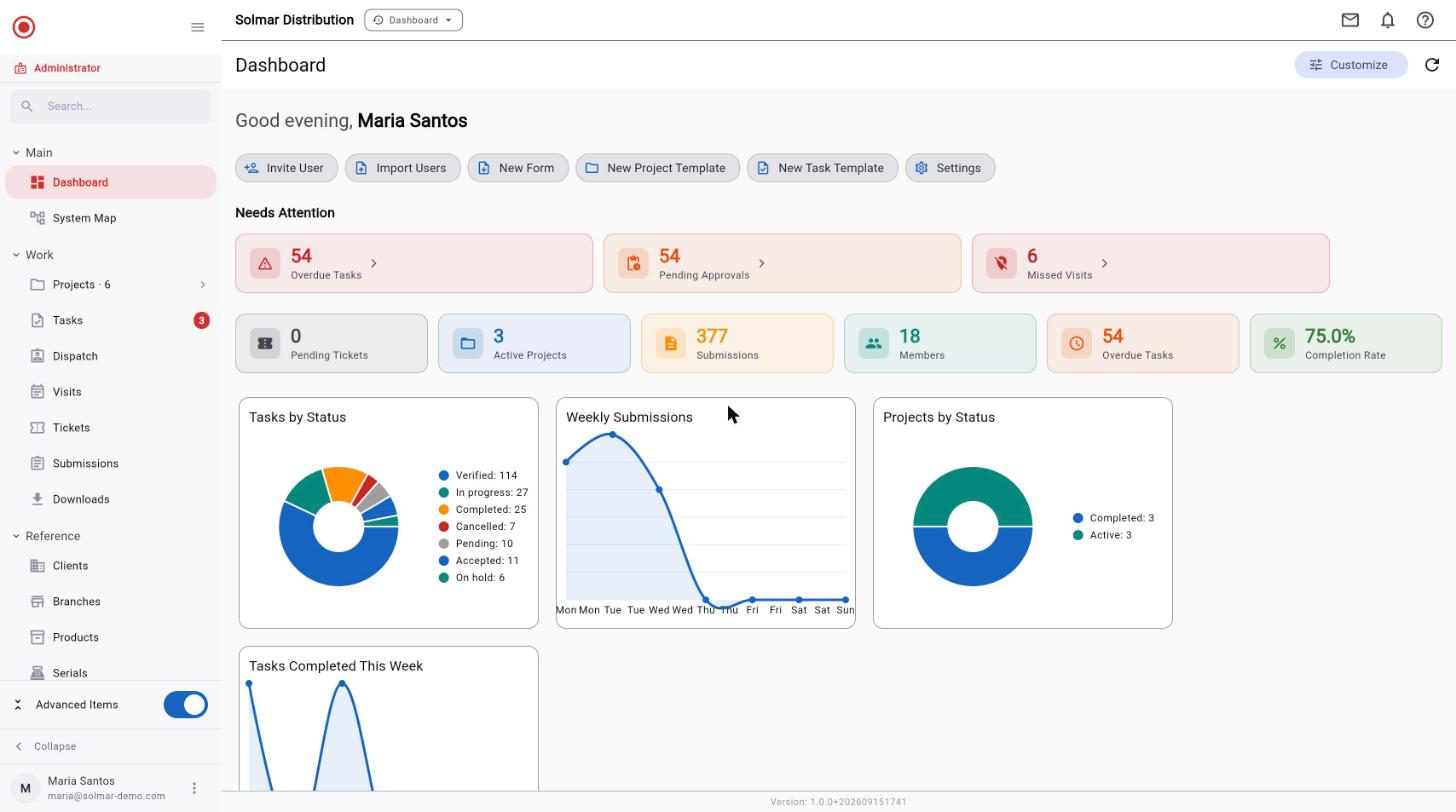
- **Dashboards**: Real-time KPIs, task completion rates, submission trends, visit statistics.
### AI & Integration
- **AI Analytics Assistant**: Natural language data queries. Auto chart/table generation. Conversation history. Supports OpenAI, Anthropic, Google AI, Azure. Organization's own API key.
- **MCP Server**: 26 tools (12 read, 14 write). Permission-bounded. 7 schema resources. 5 prompt templates. Connect Claude Desktop, IDE plugins, custom apps.
- **API Access**: REST API for submissions and reports. API keys with scopes and quotas. Audit logging.
### Team Management
- **Users**: Email invites, multi-org support, admin password reset, activity tracking.
- **Groups**: Hierarchical structure, group leaders with scoped access.
- **Roles & Permissions**: 7 built-in roles. Custom roles. 162 permission combinations (18 resources x 9 actions). Quick and Advanced permission pickers.
### Communication
- **Messaging**: Direct messaging, tap-to-acknowledge, read receipts, threads, channels.
- **Push Notifications**: Task, submission, visit, and message alerts. Multi-device. Deep linking.
- **Notification Center**: Centralized inbox, read/unread, date grouping.
## Platform
- Multi-tenant with complete data isolation
- Personal data behind controlled access: sensitive IDs masked, erase on request
- Owner-only settings for lasting changes, every change logged; regional access for regional managers
- Each office keeps its own time zone; dates and report periods follow the office's working day
- Module feature toggles (Clients, Products, Serials, Lots, Databases, Workflows)
- Self-service registration with trial period
- Cross-platform: Flutter for web, iOS, Android
- Full offline mobile support with automatic sync
- Human-readable IDs (Dated, Org-Prefixed, Simple formats)
## Applications
- **Web App**: Dashboard, project/task management, form builder, submission review, visit scheduling, data management, report builder, team admin, settings.
- **Mobile App**: Task execution, form filling with photos/signatures/barcodes, GPS check-in, attendance, product/serial browser, offline mode, messaging.
- **Admin Portal**: Organization management, module toggles, user admin, templates, subscription plans, platform analytics.
## Industries
FMCG & Retail, Field Services, Healthcare, Construction, Logistics, Agriculture, Utilities, Real Estate, Local Government, Security Teams.
## Solutions (add-ons)
Ready-made workflows, switched on per organization by the Raios360 team; some carry a fee of their own.
- **ID Document Capture**: Photograph the ID. The record fills itself in. https://raios360.com/solutions/id-document-capture
- **Leads**: From first contact to client, without retyping a thing. https://raios360.com/solutions/leads
- **On-Shelf Availability**: Know which must-carry products are on the shelf, store by store. https://raios360.com/solutions/on-shelf-availability
- **Paper Form Capture**: Keep the paper. Lose the re-keying. https://raios360.com/solutions/paper-form-capture
- **Personnel Monitoring**: A work order opens the gate. A badge alone does not. https://raios360.com/solutions/personnel-monitoring
- **Public Feedback Survey**: A QR code at the counter, and every answer in a dashboard. https://raios360.com/solutions/public-feedback-survey
- **Visitor Management**: Every visitor signed in, compared, and approved by a person. https://raios360.com/solutions/visitor-management
## Pricing
- **Free Trial**: 30 days, all features, unlimited users, no credit card required
- **Standard**: $18/user/month ($15/user/month billed annually — save 17%)
## Links
- Register: https://app.raios360.com/register
- Login: https://app.raios360.com/login
- Website: https://raios360.com
- Product Brochure (PDF): https://raios360.com/raios360-brochure.pdf
From assignment to verified result
Four steps, and what each one actually looks like. Every screen below is a live Raios360 account — not a mockup.
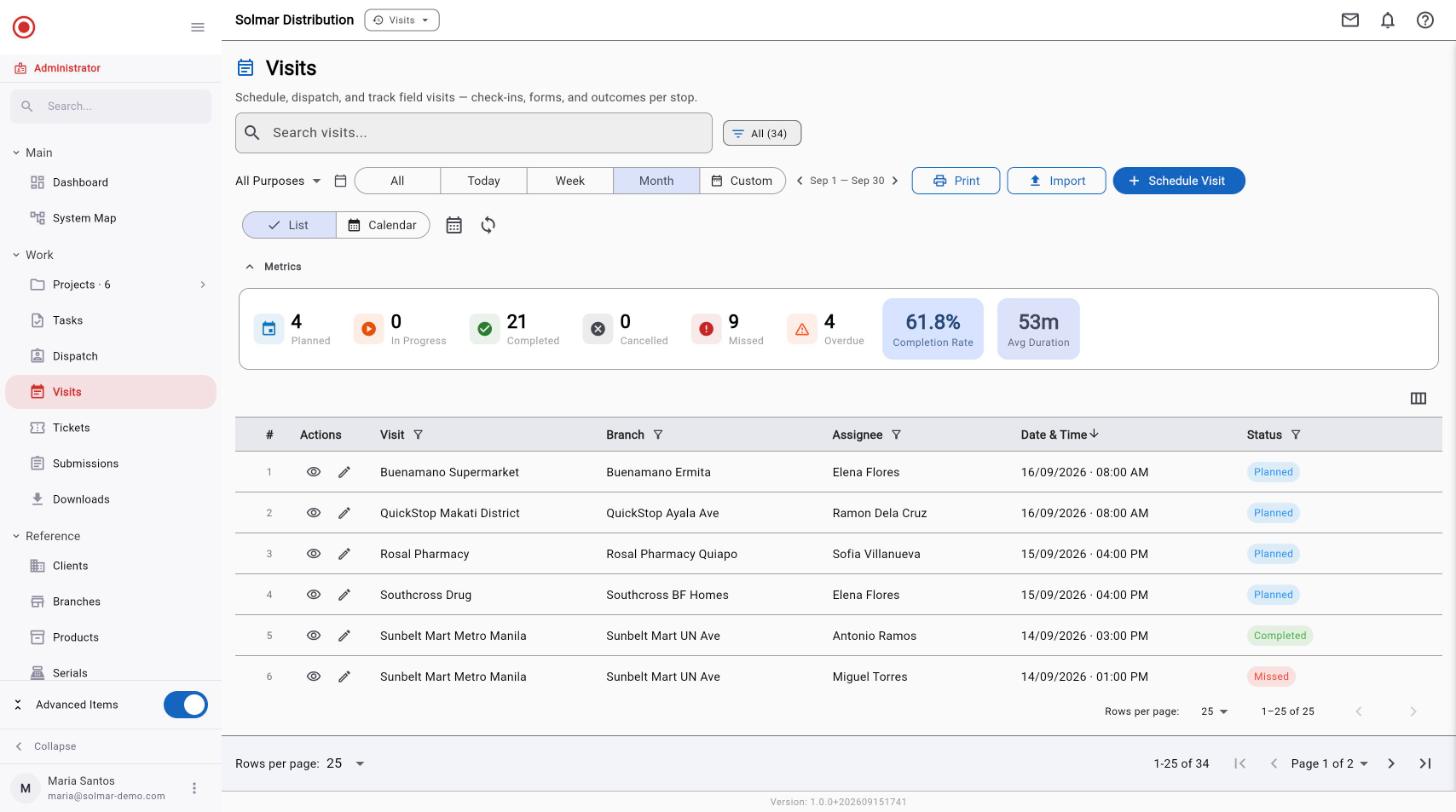
Step 01 · Assign
Work starts as a plan, not a message.
Scheduled visits and tasks carry the branch, the person and the date before anyone leaves the office. The same round shows up on the field worker's phone, so nobody is working from a screenshot of a spreadsheet or a message thread.
- Each stop names its account, branch, assigned rep and date
- Planned, completed, missed and overdue are counted as the week runs
- The worker's phone shows the same schedule, ready before they set off
Step 02 · Execute
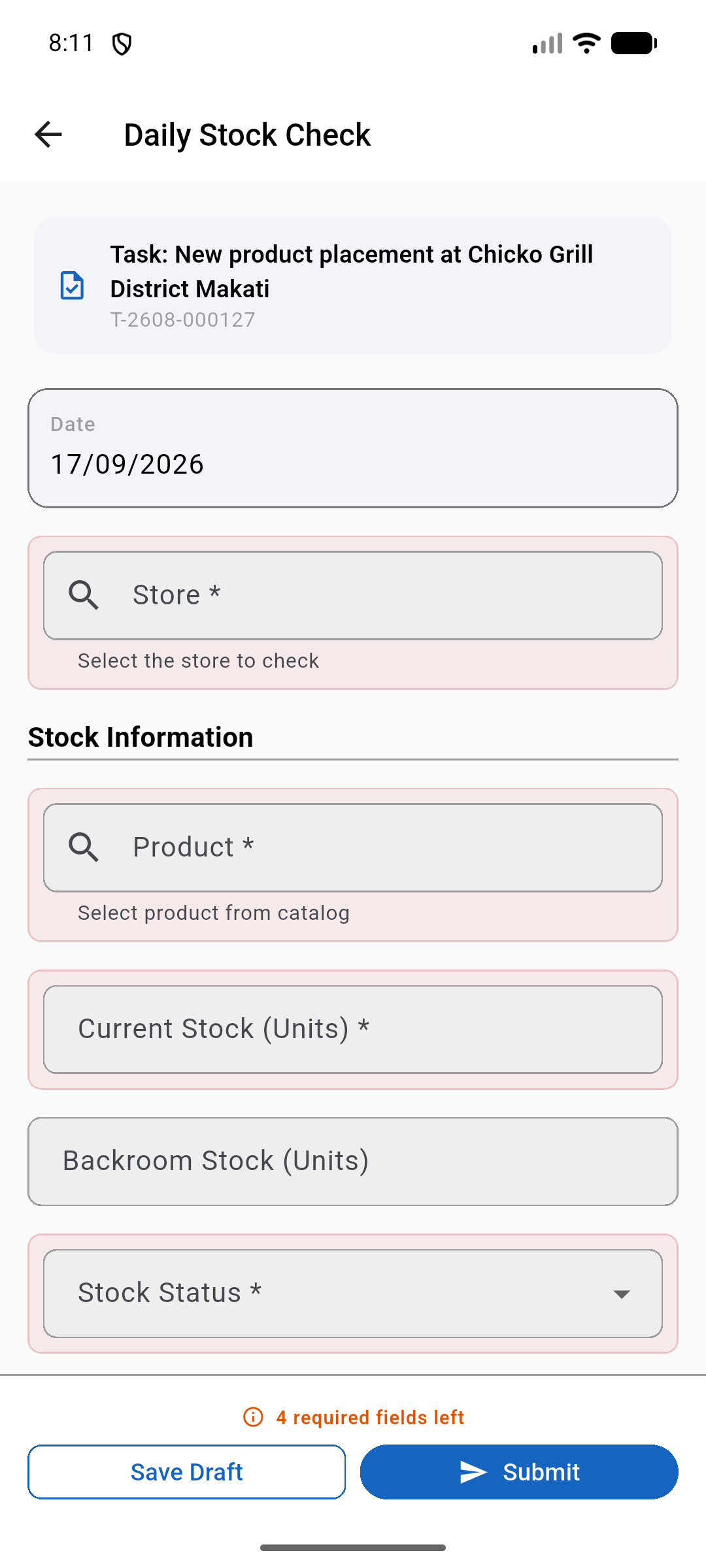
Captured where the work happens — signal or no signal.
The form opens against the job it belongs to and fills in what it already knows. It tells the worker what is still missing before it will accept a submission, and it holds the work on the device until there is a connection to send it on.
- The form opens against its task, and knows the date without being told
- Stores and products come from the account's own records, not free text
- Required fields are counted down; nothing submits half-finished
- Drafts survive with no connection and sync when one returns
Step 03 · Verify
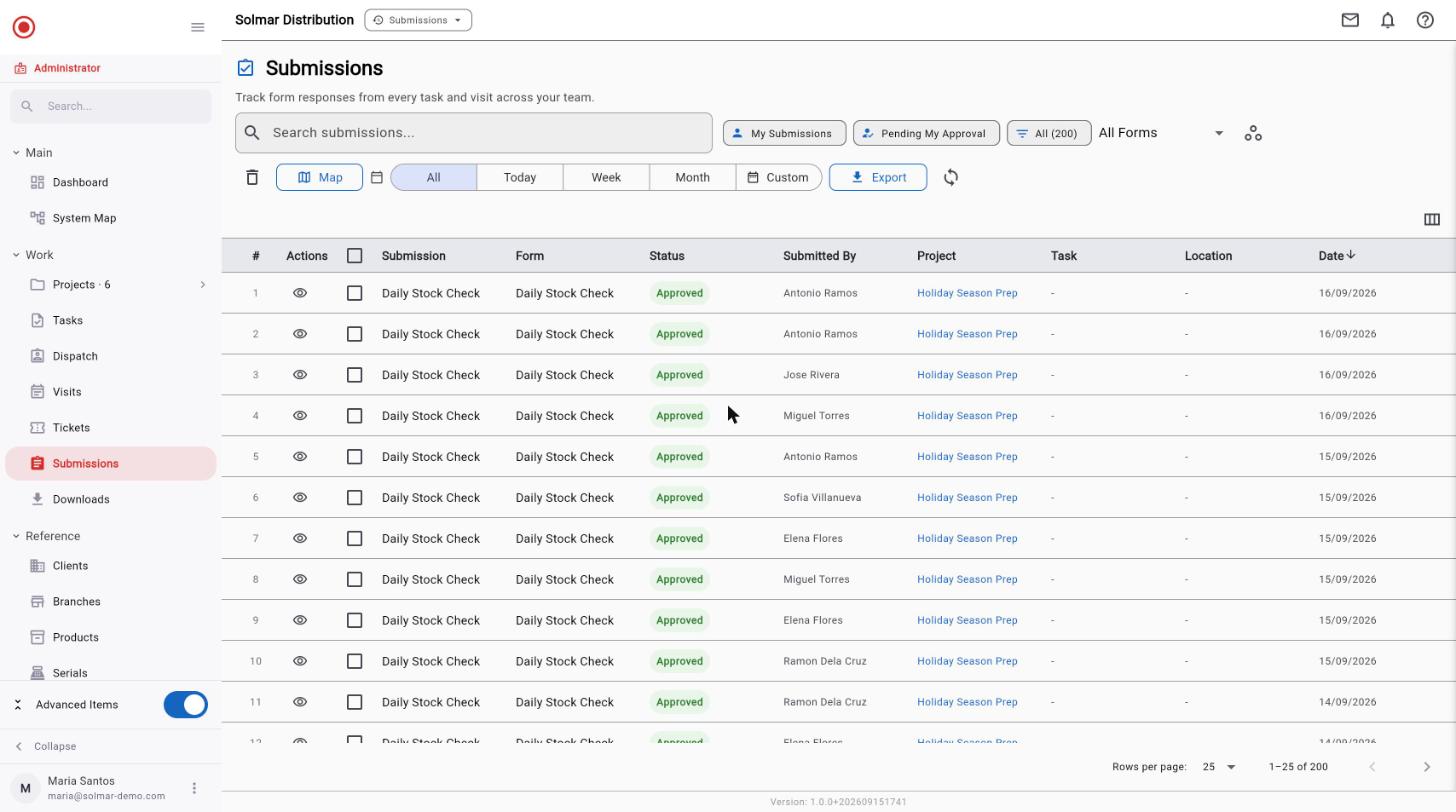
Every answer arrives attached to who, where and when.
Submissions land in one place with their author, their job and their position in approval. Nothing has to be chased down, and nothing is taken on trust — the evidence travelled with the record instead of being typed up afterwards.
- Who submitted it, against which job, on what date
- Where it is in approval — submitted, approved, rejected
- Location and photos captured at the moment, not reconstructed later
Step 04 · Act
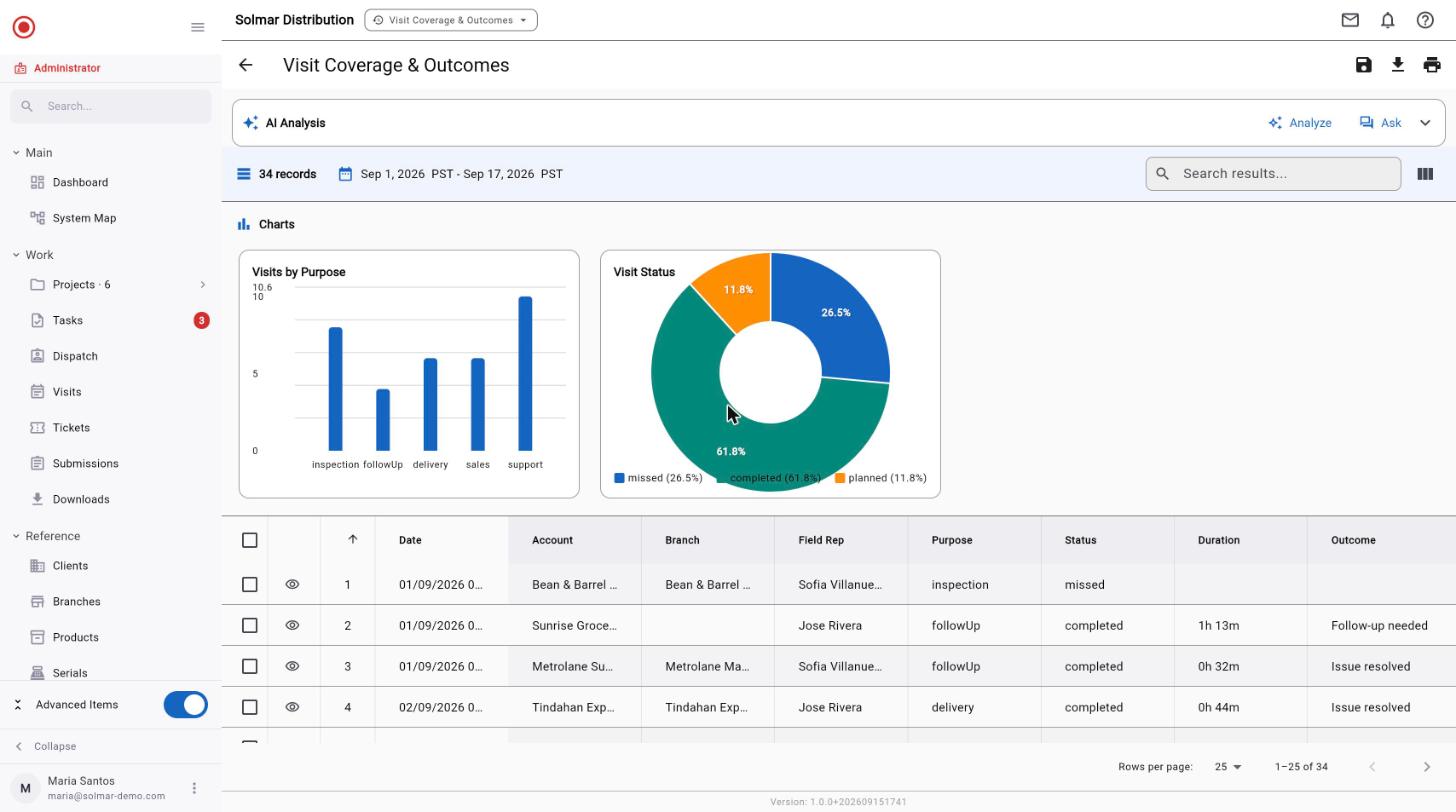
The report is already built when you go looking for it.
Coverage, outcomes and exceptions come off the same records the field just created. Nobody exports anything, nobody rebuilds it in a spreadsheet, and the number a manager acts on is the number the worker captured.
- Charts and tables drawn from live records, not a copied extract
- Coverage by territory, outcomes by purpose, misses called out
- Ask the report a question in plain language, or export it
The result
One place that already knows what happened.
Because every step wrote to the same record, nobody spends Monday assembling last week. What needs attention is on the screen when you open it.
See it with your own work in it.
30 days free. No credit card required.